


Learn how to appeal and restore your Twitter account when it gets suspended in this tutorial.
There are several reasons why your Twitter account may get suspended. Twitter decides to suspend a user’s account if it’s been compromised or on the grounds of not adhering to Twitter rules.
Twitter accounts mostly get suspended because Twitter thinks your account might be spammy, or fake, or if it detects abusive Tweets or behaviour that can harm other users.
You can appeal to Twitter to get your account unsuspended and restored as usual if you haven’t done any serious violation of their rules.
Follow the steps below as I walk you through this step-by-step guide for getting your Twitter account resuspended.
The screenshots that you see in the tutorial below are from a client’s Twitter account(@SocialShire) when it was suspended and appealed to get it restored.
Make sure your Twitter account says it’s been suspended. When your account is suspended, your Twitter account URL will be redirected to this account suspended page.
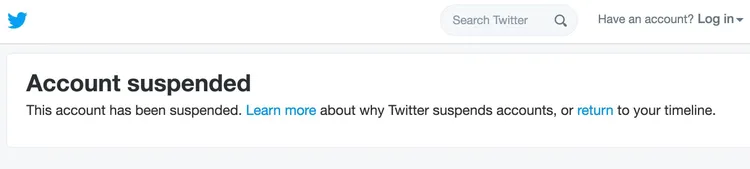
Steps to Submit Appeal Form for Suspended Account
Step 1: The first step is to log in to your Twitter account. Sometimes, restoring your suspended Twitter account can be as simple as verifying your email address or adding your phone number to your account.
If you see any notifications asking you to provide your phone number or verify your email address, follow the instructions and your account will be unsuspended shortly.
Step 2: If you don’t see any such notifications, you might only see a prompt like below asking you to visit the Suspended Accounts page for more information.
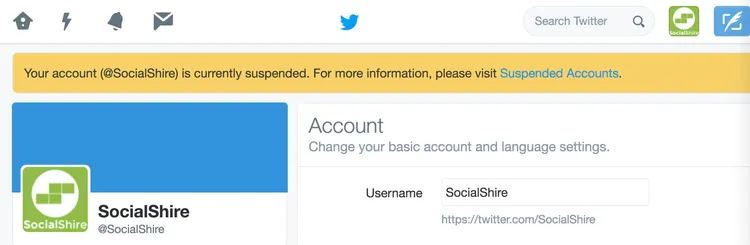
You might want to visit the page and learn more about why your account might have been suspended.
Step 3: So, if you think Twitter made a mistake suspending your account, go to this Appeal Form and submit a description of why you think Twitter might have suspended your account.
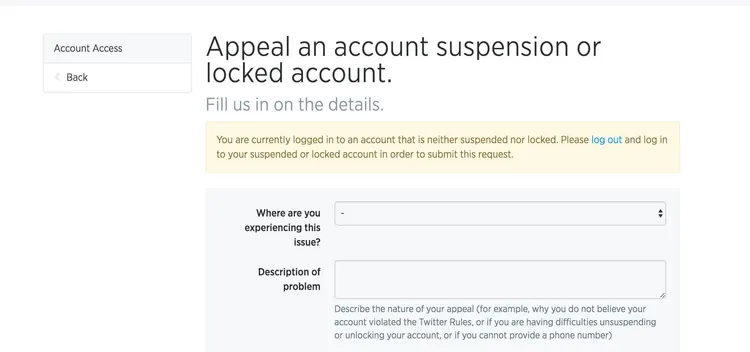
Please ensure that you have been logged in from your suspended account to access this form. You will see a notification asking you to login if from the suspended account if you are logged in from any other active account.
Step 4: You can just select desktop for the first question asking you “Where are you experiencing this issue?”
Second, take some time to explain the issue and why you think your account might have been suspended.
Remember, you are writing to a real person on the other end – it pays to be polite.
Step 5: You can now expect an email from Twitter support within the next few days.
Step 6: If they are convinced of the reasons or might have done it in error, you will get an email shortly saying your account has been unsuspended.
Step 7: It only took a few hours for my account @socialshire to get unsuspended and here’s the email that I received.
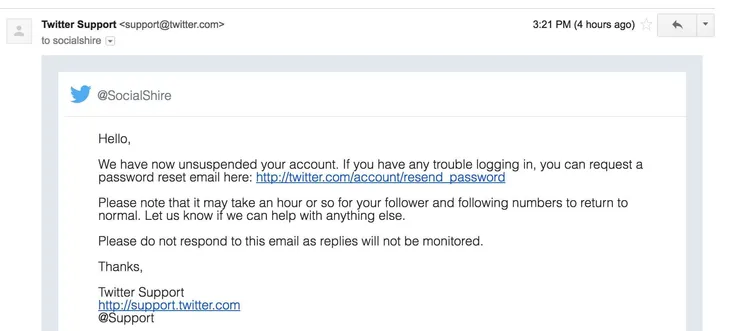
If you receive any other email, please follow the guidelines and cooperate with them to get your account unsuspended.
You can find more forms for several other Twitter issues such as getting your account restored, help with a locked account or verifying your account on this page.
I hope the tutorial was useful to help you unsuspend your Twitter account. Please let me know if you have any questions in the comments below.